

Download Cisco Secure Email – Secure Business Email Management Tool
Overview
Cisco Secure Email is a trial‑version web application built specifically for businesses that need a reliable, secure, and easy‑to‑manage email client. Positioned within the email‑client category, this solution focuses on strengthening the everyday workflow of email handling while embedding advanced security controls that protect sensitive corporate information. The platform’s design philosophy centers on simplicity: a clean, modern interface lets users navigate through inboxes, folders, and security settings without a steep learning curve.
For organizations that prioritize data confidentiality, the inclusion of spam filtering, phishing detection, and encryption tools means that every incoming and outgoing message is examined for threats before it reaches the user’s eyes. Because it is delivered as a web‑based service, Cisco Secure Email works across multiple operating systems and devices, eliminating the need for bulky desktop installations. Companies can spin up a trial account, explore the full feature set, and assess the impact on productivity and security before committing to a full‑license purchase.
This makes Cisco Secure Email an attractive entry point for small‑to‑medium enterprises and large corporations alike that are looking to modernize their email infrastructure while staying compliant with industry regulations.
Key Features
- Advanced Spam & Phishing Protection: Real‑time analysis of inbound messages using Cisco’s threat intelligence to block malicious content before it reaches the inbox.
- End‑to‑End Encryption: Seamless TLS encryption for outgoing mail and optional S/MIME for highly confidential communications.
- Intelligent Folder Management: Automated rules that sort messages into categories such as “Invoices,” “Projects,” or “HR” based on content and sender.
- Secure Attachments: Built‑in sandboxing that scans attachments for malware and offers a safe preview mode.
- Compliance Reporting: Generates audit logs and compliance reports that satisfy GDPR, HIPAA, and other regulatory requirements.
- Multi‑Device Sync: Real‑time synchronization across desktops, laptops, tablets, and smartphones via any modern web browser.
- Customizable Security Policies: Administrators can define granular policies for password complexity, MFA, and session timeouts.
- Integrated Calendar & Contacts: A lightweight calendar and address book that share the same security perimeter as email.
- Role‑Based Access Control (RBAC): Different permission levels for users, managers, and IT admins to limit exposure of sensitive data.
- 24/7 Support During Trial: Access to Cisco’s support portal and knowledge base while evaluating the product.
Installation & Usage Instructions
Getting Started with the Trial
To begin using Cisco Secure Email, visit the official Cisco trial page and click the “Start Free Trial” button. You will be prompted to create a Cisco account or sign in with an existing one. After confirming your email address, you’ll receive a welcome message containing a secure link to the web‑based dashboard. No software download is required; the application runs entirely in your browser, which means you can start managing email from any device with internet access.
Configuring Your Account
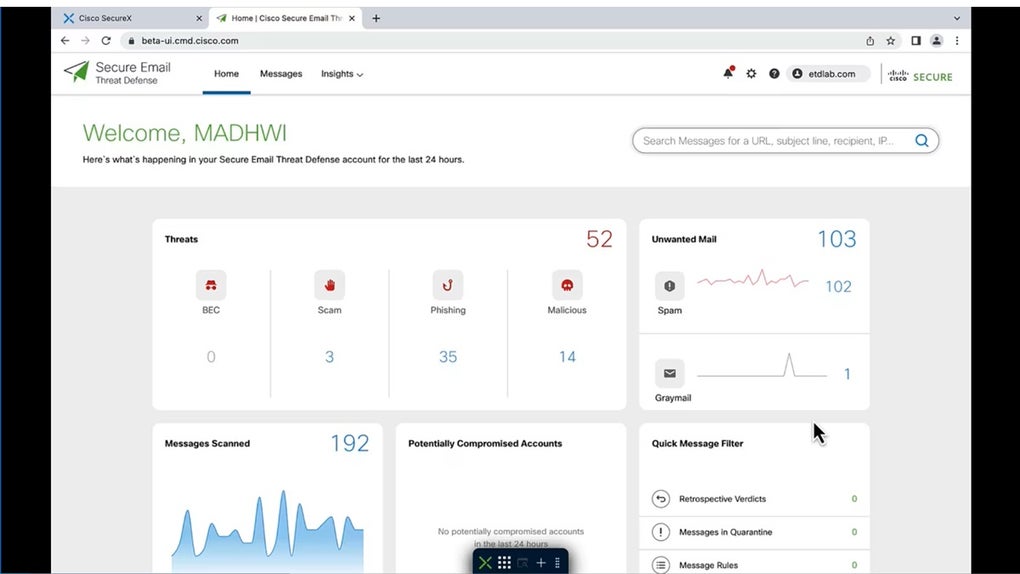
Once logged in, the onboarding wizard guides you through three essential steps: (1) linking your existing corporate mail server (Exchange, Office 365, or a standard IMAP/SMTP service), (2) setting up domain‑level security policies, and (3) inviting team members. The wizard automatically discovers server settings when you provide admin credentials, reducing manual configuration errors. After the initial setup, the dashboard displays an overview of inbox health, spam detection rates, and compliance status.
Daily Workflow
Using Cisco Secure Email mirrors the experience of any modern email client. The left navigation pane hosts folders, tags, and the integrated calendar. The main pane shows a list of messages with quick‑action buttons for reply, forward, or “Secure Reply” (which encrypts the message automatically). A powerful search bar supports Boolean operators and filters by date, attachment type, or security tag. For power users, keyboard shortcuts and customizable quick‑reply templates accelerate routine communications.
Maintaining Security
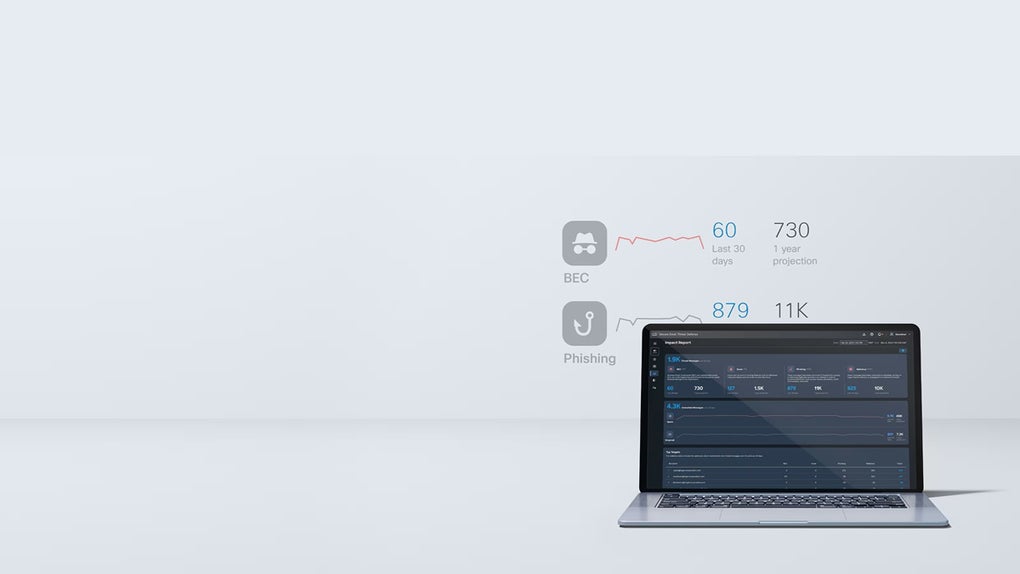
Security is an ongoing process. Administrators should regularly review the “Threat Dashboard” to see the latest blocked phishing attempts and adjust filtering rules accordingly. The platform also offers a “Quarantine” area where suspicious messages are held for manual review. Periodic password changes and multi‑factor authentication (MFA) enforcement are configurable under the “Security Settings” tab, ensuring that only authorized personnel can access sensitive mailboxes.
Updating & Scaling
Because Cisco Secure Email is a cloud‑hosted service, updates are applied automatically without downtime. When the trial ends, you can upgrade to a paid plan directly from the dashboard; the transition is seamless, and all existing data and policies migrate intact. Scaling to additional users is as simple as adding new accounts in the “User Management” section, making it easy for growing businesses to expand their email security footprint.
Compatible Operating Systems: Windows 10/11, macOS Monterey and later, Linux distributions with modern browsers, iOS 14+, Android 9+ (any device that can run Chrome, Edge, Safari, or Firefox).
Pros and Cons
Advantages
- Robust spam and phishing protection powered by Cisco’s global threat intelligence.
- No client‑side installation required – works in any modern browser.
- End‑to‑end encryption and secure attachment handling keep confidential data safe.
- Comprehensive compliance reporting for regulated industries.
- Scalable architecture that grows with your organization.
- Role‑based access control ensures that users only see what they need.
- Free trial with full feature access and 24/7 support.
Drawbacks
- Dependent on a stable internet connection; offline access is limited.
- Advanced customization may require Cisco’s technical consulting services.
- Pricing after the trial can be higher than some niche email security plugins.
- Learning curve for administrators unfamiliar with Cisco’s security ecosystem.
- Limited third‑party integrations compared to larger, established email suites.
Frequently Asked Questions
Is Cisco Secure Email completely free during the trial?
Yes, the trial version provides full access to all features for 30 days without any hidden charges. You can invite unlimited users during the trial, allowing your entire team to evaluate the platform.Can I integrate Cisco Secure Email with Microsoft 365?
Absolutely. Cisco Secure Email supports native integration with Office 365 and Exchange Online, allowing you to route mail through Cisco’s security layers while preserving native calendar and contact sync.What encryption standards does Cisco Secure Email use?
The service uses TLS 1.2/1.3 for transport encryption and offers S/MIME for end‑to‑end message encryption. Administrators can enforce encryption policies on a per‑domain or per‑user basis.How does the spam filtering work?
Cisco’s cloud‑based threat intelligence engine evaluates each inbound email against known spam signatures, reputation databases, and machine‑learning models that detect phishing patterns. Suspicious messages are automatically quarantined and can be reviewed by administrators.Is multi‑factor authentication (MFA) required?
MFA is optional but highly recommended. The platform integrates with Cisco Duo, Google Authenticator, and other standard MFA providers to add an extra layer of security for user logins.Conclusion – Secure Your Business Email Today
In today’s threat‑filled landscape, email remains the most common vector for data breaches. Cisco Secure Email delivers a comprehensive suite of security tools wrapped in an intuitive, web‑based client that works across Windows, macOS, Linux, iOS, and Android. The free trial lets organizations experience the full power of Cisco’s threat intelligence, encryption, and compliance reporting without any upfront investment. While the platform’s reliance on an internet connection and the need for occasional expert guidance may be considerations for some, the overall value proposition is strong for businesses that prioritize security and want a single solution that scales with growth.
If you’re ready to protect your inbox from spam, phishing, and data leakage while improving productivity, download Cisco Secure Email now and start your 30‑day trial. Experience a secure, modern email environment that adapts to your organization’s needs.



.png)



